

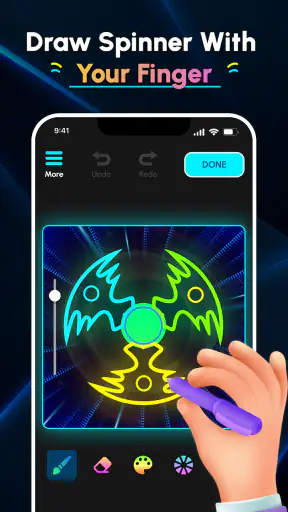
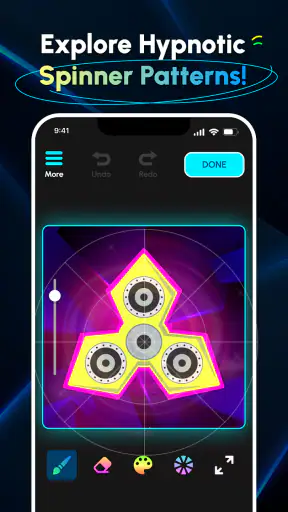
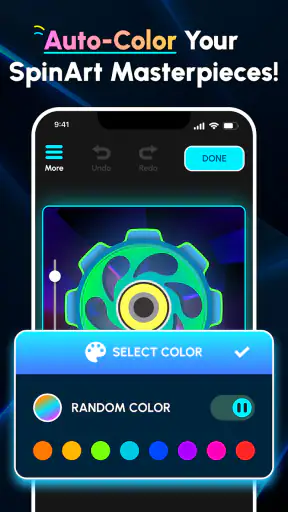
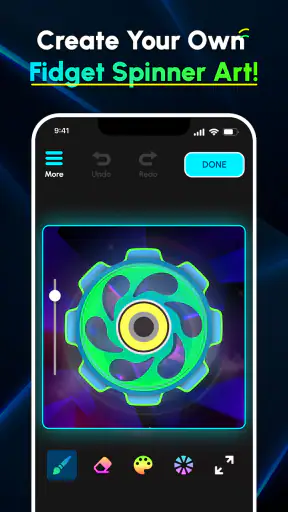
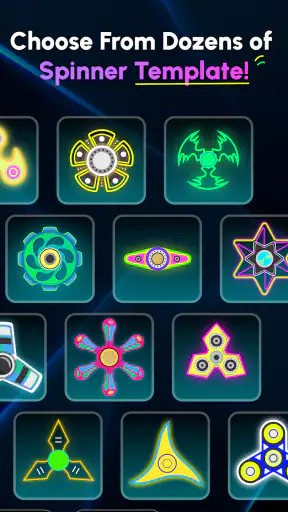
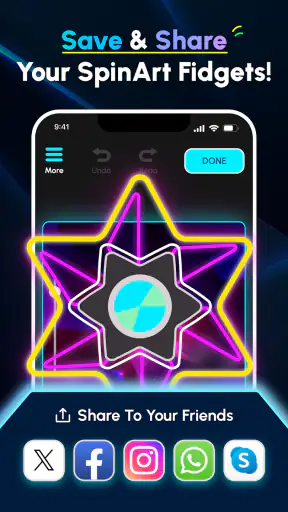
I opened Glow Finger Spinner expecting a quick distraction and found an art app built around a very simple idea: draw spinner designs with a finger and watch the result become more visually interesting through repetition. That simplicity is both its strongest quality and its main limitation. You can begin immediately, without learning a complicated creative tool, but the experience depends heavily on whether you enjoy experimenting with shapes for its own sake.
Developed by Braly JSC, this free app sits in the Art & Design category rather than trying to be a full drawing studio. Its audience is broad—the content rating is Everyone—and the minimum requirement of Android 7.0 makes it accessible on many older phones as well as newer devices. I would describe it as a casual sketching toy with a glowing, spinner-focused identity, not as a replacement for an illustration app.
My first impression was positive because the central action is easy to understand. I did not need a tutorial explaining layers, brushes, palettes, or export settings before making something. The appeal comes from placing marks, seeing them repeated around a center, and adjusting my next attempt based on what appeared on screen. That immediate feedback makes the first session feel playful rather than instructional.
How the experience changes after the first week
The first sessions reward curiosity
During the first week, the app works best as a small creative break. I could pick it up when I had a few spare minutes and start drawing without preparing a project. A short line can become part of a larger circular pattern, so even an unplanned gesture may look more deliberate after the spinner effect takes over. That makes experimentation less intimidating for people who do not think of themselves as artists.
The most useful way to approach the opening sessions is to treat each drawing as a test rather than a finished picture. I found that slow curves, repeated dots, and changes in pressure or direction—where the device and drawing behavior allow them—produce very different visual rhythms. Trying one idea at a time is more rewarding than scribbling continuously, because it becomes easier to understand which movement created the final appearance.
A realistic everyday use case is a short break between tasks. Instead of opening a demanding game or scrolling through social feeds, I can spend a few minutes making a symmetrical design, look at the result, and stop. That low commitment is important. The app does not ask me to remember a story, manage a collection, or reach a particular score before the session feels complete.
It can also work well for children who want to draw on a phone but may become frustrated by a conventional blank canvas. The spinner treatment gives their marks a sense of transformation, so a basic shape can feel more exciting than it would in a standard sketching app. Because the age rating is Everyone, it is positioned for a general audience, although I would still supervise younger children when sharing a personal device.
Why the novelty feels stronger at the beginning
The first-week appeal comes from the surprise between the gesture I make and the pattern I see. I am not simply drawing one line; I am discovering how that line behaves when arranged as part of a spinner design. This creates a small reveal each time I finish a mark. The effect is especially satisfying when an accidental shape looks balanced or decorative.
There is also a useful psychological advantage in the app’s narrow focus. Traditional art apps can present so many tools that I spend more time choosing a brush than drawing. Here, the limited concept pushes me toward making something quickly. For a beginner, that can be more encouraging than opening a professional canvas filled with controls.
Still, the same narrow focus means the early excitement may be strongest for users who enjoy visual repetition. If you want realistic painting, detailed character work, handwriting practice, or precise graphic design, the spinner concept will feel restrictive almost immediately. I would not install it expecting a structured course or a serious portfolio tool.
Small techniques that make early experiments better
One practical tip is to begin near the center and then compare that result with a design made farther out. Central marks tend to create a different sense of density from outer marks, and comparing the two helps reveal how placement affects the final composition. I also recommend pausing between strokes instead of filling the screen in one movement. That makes it easier to identify which gesture produced a pleasing section.
Another useful habit is to repeat a simple shape several times before trying something complicated. A single curve can show whether I like the balance and spacing of the design. Only after that do I add sharper turns or clustered marks. This workflow reduces visual clutter and makes the app feel more like a small design laboratory than random doodling.
I also found value in using the app with a specific mood in mind. Soft, rounded movements suit a calmer pattern, while quick angular gestures create a busier result. This is not the same as controlling every detail in a professional editor, but it gives the drawing process a direction. Without that intention, sessions can become repetitive sooner.
What remains useful month after month
Recurring value depends on how you use it
After the initial novelty fades, the app’s lasting value comes from its role as a low-pressure creative ritual. I can return to it when I want to make something without committing to a large project. That is a real benefit for people who like doodling but rarely maintain a sketchbook. The short format lowers the barrier to practice.
However, I would not call it an app with unlimited depth. Its recurring value is based on personal experimentation, not on a large progression system or a broad set of artistic disciplines. If the central spinner transformation stops surprising you, there may be little reason to open it every day. The experience does not automatically create a long-term habit; the user has to supply the purpose.
For me, the best monthly use is occasional rather than constant. I would keep it installed for moments when I want a visual reset, but I would not expect it to replace a main creative app. That distinction matters when deciding whether it deserves permanent space on a phone. It earns that space for casual creators who appreciate quick pattern-making, not for everyone who downloads it once out of curiosity.
Who can get the most from it
Glow Finger Spinner is a good match for someone who wants finger-based drawing with a distinctive visual result and very little setup. It suits children, casual doodlers, people looking for a relaxing break, and beginners who find traditional drawing tools too open-ended. It may also appeal to anyone who enjoys symmetry, repeated forms, and the satisfaction of turning a small gesture into a larger design.
It is less suitable for an artist who needs dependable precision, multiple stages of editing, or a clear route from sketch to finished illustration. A conventional drawing app is the better choice when I need layers, detailed brush control, typography, photo editing, or a canvas that behaves like paper. A coloring app is also preferable when the goal is to fill prepared artwork rather than create patterns from scratch.
Compared with a standard doodling tool, this app offers more immediate visual transformation but less freedom. Compared with a professional art app, it is easier to start but far less capable. Compared with a casual game, it has no need for competition or objectives to be enjoyable, yet it may feel less motivating to users who need rewards and progression. Those trade-offs define its place clearly.
Does it become a habit or just a novelty?
The answer depends on whether I can give each session a small challenge. For example, I might spend one day exploring only curved strokes, another comparing dense and open compositions, and another trying to create a design that feels balanced with very few marks. These constraints create variety without requiring features that are not part of the app.
Without a personal challenge, the routine can flatten into the same gesture-and-reveal cycle. That is the main reason some users may uninstall it after the first week. The app provides the canvas for experimentation, but it does not necessarily provide enough external structure to keep every user engaged for months.
Its reach suggests that the concept has found a sizable audience: the app has passed five million installs, while its average rating is 4.3 from around two hundred ratings. I read those figures as evidence of broad curiosity and generally favorable reception, not as proof that it will suit every long-term creative routine. A popular quick-play idea can still be the wrong fit for someone seeking depth.
Maintenance, friction, and the reasons fatigue can appear
The maintenance burden is low, but not invisible
One advantage is that I do not need to maintain a complicated project library to enjoy it. There is no demanding workflow to organize before drawing, and the simple premise makes returning after a gap easy. I can forget about it for a while and come back without relearning a system.
The maintenance burden instead comes from managing expectations. If I expect every session to produce a remarkable design, the repetition becomes tiring. The better approach is to treat the app as a small creative exercise. Some results will be attractive, some will be messy, and the value is in the act of testing an idea rather than guaranteeing a polished outcome.
Device compatibility is another practical consideration. The app supports Android 7.0 and later, which covers a wide range of phones, but drawing comfort still depends on the screen and touch response of the device. On a smaller display, detailed gestures may feel cramped. On an older phone, I would keep expectations modest and close other demanding apps if the drawing experience feels less responsive.
Where fatigue comes from
The biggest source of fatigue is the limited creative vocabulary. Spinner-based patterns can look different from one another, but they remain connected to the same basic visual logic. Once I have explored broad curves, tight marks, and dense repetition, the next experiments may feel like variations rather than new activities.
Another possible frustration is the gap between intention and result. Someone looking for exact placement may find the process unpredictable. That unpredictability is part of the charm during the first sessions, but it can become annoying when I have a specific composition in mind. Users who prefer control over happy accidents should choose a more conventional drawing environment.
The app can also lose momentum if I approach it as a productivity tool. It is not the right choice for creating a logo, preparing a presentation graphic, or producing a detailed illustration. Its strength is spontaneous visual play. Asking it to perform a professional design task would create disappointment that the app itself is not designed to solve.
Version and everyday expectations
The current version is 1.1.5, and the app is free to use. That makes trying it straightforward for someone who wants to test the concept without making a financial commitment. I still recommend checking the experience on the intended device before encouraging a child or a group to depend on it for a creative activity, because touch comfort matters more here than it would in a passive viewing app.
I would also keep the app’s purpose clear when recommending it. Calling it a drawing studio sets the wrong expectation. Calling it a spinner-pattern sketching toy is more accurate and helps the right audience understand why its focused design can be enjoyable. The app works best when quick experimentation is the goal, not when finished artwork is the requirement.
My long-term verdict
After looking beyond the first burst of novelty, I think Glow Finger Spinner earns a place on a phone for users who genuinely enjoy making repeated, glowing-looking designs with a finger. It is approachable, free, suitable for a general audience, and quick to revisit. Braly JSC has kept the idea focused enough that I can start creating without the intimidation found in larger art suites.
Its long-term weakness is equally clear: the concept has a natural ceiling. The app does not offer the broad creative range of a full drawing program, and its replay value depends on the user inventing fresh experiments. If I want lessons, detailed editing, serious illustration, or a strong progression loop, I would choose another category of app instead.
My recommendation is therefore conditional but positive. Install it if you want a relaxing visual diversion, enjoy symmetry, or need an easy way to turn a few spare minutes into a small creative session. Give it a fair test by trying deliberate stroke limits and comparing different placements rather than repeating the same scribble. If those experiments still feel satisfying after the first week, it may become a pleasant occasional habit.
If the reveal stops feeling interesting, there is no reason to force a daily routine. That is not a failure; it simply means the app has served its purpose as a short-form creative toy. For me, it has more lasting value than a one-minute novelty because it supports personal experimentation, but it remains a specialist tool. I recommend it as a compact art break, while keeping a fuller drawing app for work that demands control and depth.


